

That Retired Smartphone Still has Work to Do
Old phones often sit idle, yet putting one back to work can deliver real environmental and practical benefits. The Global E‑waste Monitor reports 62 million tonnes of e‑waste were generated in 2022, with only 22.3% formally collected and recycled — so reuse before recycling meaningfully reduces waste (Global E‑waste Monitor). Lifecycle analyses show most of a smartphone’s emissions come from production, not use; extending service life can avoid “tens of kilograms” of CO2e that would otherwise be embedded in a replacement device (Apple iPhone 15 Product Environmental Report; Fairphone LCA).
Instead of trading in, you can repurpose a working phone as a baby monitor, smart speaker, or security camera — an approach that aligns with how people now secure their homes: smartphone‑centric, DIY setups with fast mobile alerts and simple app control (Deloitte Connectivity & Mobile Trends; J.D. Power Home Security Study). Camera‑based security is mainstream: about one in five UK households now has a smart video doorbell (Ofcom Technology Tracker), and analysts continue to highlight cameras/doorbells as a resilient growth category in smart home (IDC Smart Home Tracker).
Crucially, many “retired” phones still capture higher‑detail video than some popular 1080p indoor cams. For example, an iPhone 8 records true 4K at up to 60 fps and a Pixel 3 records 4K at 30 fps at high bitrates (Apple iPhone 8 specs; GSMArena Pixel 3 tests), while a current Nest Cam (wired, 2nd gen) streams 1080p/30 (Nest Cam wired specs). Phones often record at far higher bitrates than consumer IP cams (many 4K IP cams default/max around ≈8 Mb/s, per Reolink bitrate guidance), preserving more detail in daylight. Purpose‑built security cameras, however, win on surveillance needs — low‑light/IR, weatherproofing, and 24/7 reliability — with options like 4K PoE models offering large sensors and strong WDR (UniFi Protect G5 Pro; Arlo Ultra 2) and design guidance based on DORI pixel‑density standards (Axis: DORI).
All it takes to upcycle a phone into a camera is the right app, a mount, and steady power. Energy use is modest: a phone streaming 720p–1080p with the screen off typically draws ≈1.5–3.0 W (≈13–26 kWh/year — only a few dollars at typical U.S. electricity prices), similar to small plug‑in cams (≈2–4 W; IR can raise draw) and below many PoE models (≈4–8+ W) (Wyze Cam v3 power; Axis PoE power classes). Modern USB chargers add negligible standby overhead due to strict efficiency limits (≤0.075 W no‑load in the EU) (EU EPS ecodesign); at the meter, that’s well under 1 kWh/year. For context on cost math, see EIA average residential electricity prices. Ensure good ventilation and a healthy battery for 24/7 use.
Download a Security Camera App
Phone‑as‑camera apps make this simple. AlfredCamera (iOS/Android) turns a spare phone into a camera with live view, motion alerts, two‑way talk, and optional cloud video; its Premium tier removes ads, unlocks HD, and adds features like zones (Alfred pricing). Manything, once a popular option, has since evolved into Videoloft, which now focuses on cloud storage for CCTV/IP cameras rather than using a phone as a camera. If you decide to move beyond phones, the major ecosystems — Google Nest (Google Home), Ring, Arlo, Wyze, Eufy, Blink, Reolink — pair hardware with app‑based AI alerts, zones, and cloud or local storage options (Nest Aware; Ring Protect; Arlo Secure; Wyze Cam Plus; Blink Subscription).
James West, the CEO of one such security cam app, Manything, told TechRadar that, beginning in 2012, “the smartphone was already higher resolution, packed with more sensors than your standard video monitoring camera.” Today, that edge still shows in daylight detail for many phones versus 1080p indoor cams, while purpose‑built models add surveillance strengths like IR, weatherproofing, and robust 24/7 operation (see examples above and DORI guidance). For users seeking modern cloud storage across traditional CCTV/IP cameras, Manything’s successor is Videoloft.
The Best Security Camera Apps
| Platform | Minimum system requirements | App rating | Two-way audio | Compatibility | Free storage | |
| Alfred | iOS, Android | Current iOS/Android supported; check store listing. Premium enables HD and zones (details). | High user ratings on app stores (see store pages) | ✓ | Phone-to-phone solution; not tied to Alexa/Google ecosystems | Motion clips on free tier; ads. Premium adds longer history and HD (pricing). |
| Manything | iOS, Android (now Videoloft cloud for CCTV/IP) | Pivoted to Videoloft; not a phone-as-camera solution anymore (learn more). | — | Varies by connected IP camera/NVR | ONVIF/RTSP brands; installer-focused cloud VMS | Paid cloud storage only |
| Salient Eye | iOS, Android | Recent iOS/Android; motion detector focus (see store pages) | Varies by store | ✗ | Standalone app; limited ecosystem integration | Local captures; optional cloud if offered by developer |
| Presence | iOS, Android | Requires supported iOS/Android; availability may vary by region | Varies by store | ✓ | Limited smart‑home integrations compared with major ecosystems | Limited free tier; paid upgrades for more storage/features |
To get motion detection alerts, download your chosen app on both your old and new devices, sign in to the same account, and then harden the setup: keep the phone’s OS supported and fully patched (Android Security Bulletins; Apple Platform Security), use a strong device PIN and auto‑lock, disable unneeded radios (cellular, Bluetooth, NFC), and avoid exposing streams via UPnP/port‑forwarding. National guidance recommends encrypted, brokered connections and MFA on accounts, plus placing cameras on a guest/IoT network or VLAN with WPA3 if available (NCSC camera guidance).
The majority of security camera apps operate on a freemium model — basics are free, while cloud AI and longer video history are paid. For phone‑as‑camera, see AlfredCamera Premium. For dedicated cameras, typical U.S. plan snapshots as listed on official pages: Nest Aware at $8/month per home (events, Familiar Faces) or $15/month for Aware Plus (adds longer history and optional 24/7 history on supported wired cams); Ring Protect tiers (Basic per device; Plus/Pro for whole‑home and Alarm features); Arlo Secure plans with AI detections and cloud history; Wyze Cam Plus (per‑camera and Unlimited options); and Blink Subscription for single or unlimited cameras. Verify features and pricing on the linked pages before you subscribe.
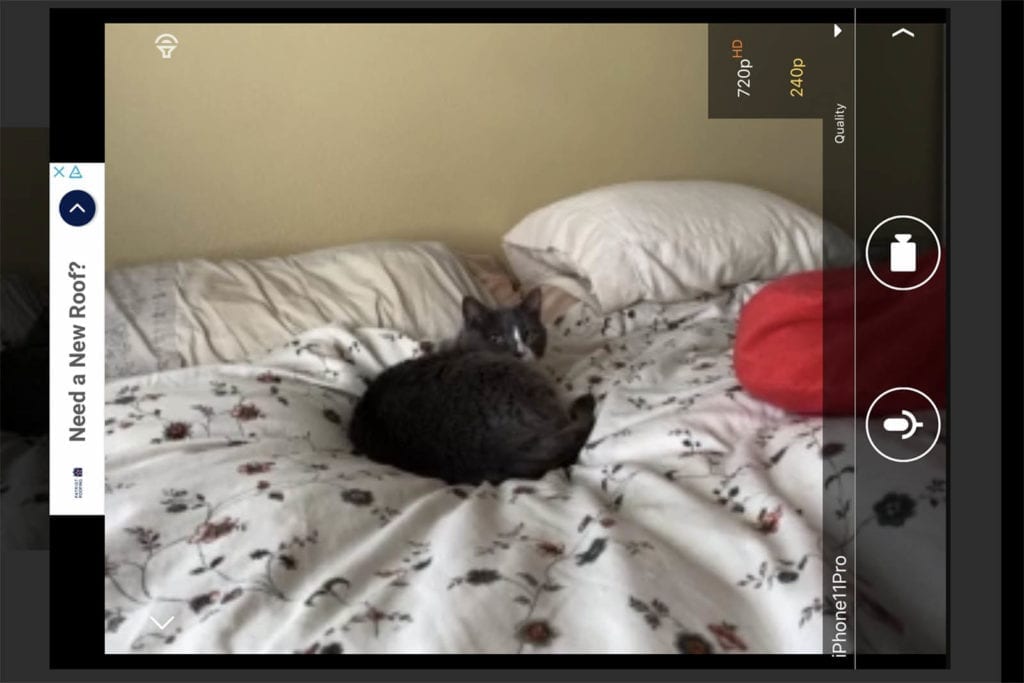
Mount the Phone
Place your old phone / new security camera where it has a clear view of entries, hallways, or the room you want to monitor. For evidence‑useful angles, size the view using DORI pixel‑density guidance: aim for ≈125 px/m at the subject distance for recognition and ≈250 px/m for identification (EN 62676‑4). Pixel density ≈ horizontal pixels ÷ scene width (m), so narrowing the field of view or moving the phone closer raises px/m (Axis: What DORI means).
A couple positioning tips to keep in mind:
- The rear-facing camera typically has higher resolution than the front-facing camera. For 24/7 stability and lower heat, set a modest stream (720p–1080p at ~15–20 fps), turn the screen fully off, and use Wi‑Fi (not cellular) — practices that keep draw near ≈1.5–3.0 W (power context; PoE power ranges).
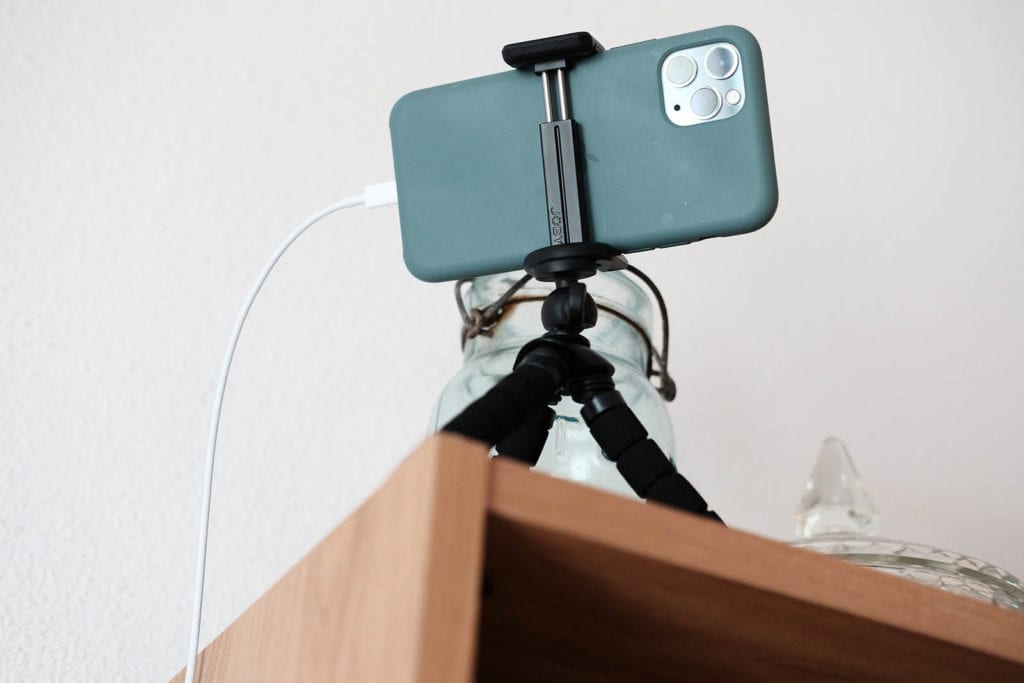
- If you have a high bookcase or shelf, use a smartphone tripod to set the phone at the right angle, and remove bulky cases that trap heat; ensure ventilation around the device.
- For positioning on a blank wall, use a smartphone wall mount.
- In either case, make sure the phone is positioned on its side for the wider field of view of landscape orientation.
- The phone will need to be permanently plugged in for reliable function — video streaming drains the battery. Consider proximity to outlets before making any holes in the wall. You will probably need an extension cord. Use a quality charger (modern adapters have very low no‑load consumption per EU EPS ecodesign) and, where supported, enable battery protection/charge‑limit features to reduce long‑term battery stress.
When Would You Want a Traditional Security Camera Instead?
A home security camera, whether indoor or outdoor, is a vital part of any home security system. Upcycling an old phone works well for many indoor, low‑cost use cases, especially where mobile alerts and quick clip review matter — priorities consumers consistently cite (Deloitte; J.D. Power). But dedicated cameras provide better night vision (IR or large‑sensor “color at night”), weather resistance, and robust 24/7 operation. With subscriptions, they add reliable AI detections and long video history: for example, Nest Aware offers whole‑home event history and Familiar Faces, and Aware Plus adds optional 24/7 history on supported wired cams; brands like Arlo also offer higher‑resolution options with Arlo Secure, while pro‑style PoE models deliver 4K sensors, wide dynamic range, and IR (UniFi G5 Pro).
If you are looking for an outdoor security camera, or just want a sophisticated, intentional-looking device, go with a dedicated CCTV camera. If you just need an extra pair of eyes on a room in your home, give the smartphone hack a try. And when your upcycled phone truly reaches end‑of‑life, route it to a certified take‑back/recycling program so critical materials can be recovered (Global E‑waste Monitor).


