


We recommend products and services based on unbiased research from our editorial team. We make money via affiliate links, which means if you click a link on our site, we may earn a commission. Any commissions we receive do not affect our recommendations; if you want to know more about how that works, read more.
The Best Wi-Fi Extenders
A Wi‑Fi extender is a fast, low‑cost fix for one or two weak rooms—especially if you can wire it with Ethernet in Access Point mode. In 2025, the best results come from matching your extender to your router’s generation (Wi‑Fi 6/6E/7), using mesh‑capable hardware (for example, EasyMesh), and keeping the router‑to‑extender backhaul strong or dedicated. Independent guides from Wirecutter and PCMag reiterate that extenders are best for targeted dead zones, while whole‑home coverage is usually more reliable with a mesh system. If you do use a repeater on the same band, expect about a 50% throughput hit on the extended link—dedicated 6 GHz backhaul (6E/7) or Ethernet avoids this penalty (NETGEAR KB).
Analysis paralysis? Subscribe to our newsletter.

Nice! Thanks for subscribing. Check your email to confirm.
The Best Wi-Fi Extenders: Summed Up
How We Chose the Best Wi-Fi Extender
Dual-band
Band usage determines throughput. Single‑radio repeaters that share one band for backhaul and clients typically cut effective speeds on the extended link by about half because every packet must be received and retransmitted on the same channel (NETGEAR). To avoid that penalty, prefer tri‑band designs (which can dedicate a 5 GHz high or 6 GHz link to backhaul) or use Ethernet backhaul/AP mode. Expert roundups from Wirecutter and PCMag consistently find that dedicated backhaul—wired or wireless—improves stability and real‑world speeds, especially in busy homes.
AC devices
Protocols define capabilities. Today’s baseline is Wi‑Fi 6 (802.11ax), which adds OFDMA and uplink/downlink MU‑MIMO for higher efficiency in multi‑device homes (Wi‑Fi Alliance on Wi‑Fi 6). Wi‑Fi 6E extends Wi‑Fi into the 6 GHz band—offering far more spectrum, including up to seven 160 MHz channels, and it requires WPA3 security (Wi‑Fi 6E). Wi‑Fi 7 (802.11be) is now certified, introducing Multi‑Link Operation (MLO), 320 MHz channels, and 4K‑QAM for higher throughput and lower latency (Wi‑Fi CERTIFIED 7; Wi‑Fi 7 overview). For standards details, see the Institute of Electrical and Electronics Engineers (IEEE) Standards Association. Match your extender to your router’s generation to preserve features and avoid bottlenecks.
MU-MIMO
MU‑MIMO lets an AP/extender serve multiple devices simultaneously. In Wi‑Fi 7, MU‑MIMO scales further—up to 16 spatial streams in the spec—with enhanced EHT sounding/feedback and tighter co‑scheduling with OFDMA and Multi‑RU, improving aggregate capacity and robustness in real homes (Intel; Broadcom). Combined with MLO, networks can reduce contention and latency by using multiple links across 5/6 GHz concurrently—benefits you’ll see most when both router and clients support newer standards.
The customers
Current retail sentiment for popular extenders typically averages 4.0–4.5 stars, but low‑star reviews cluster around setup friction (WPS failures, confusing apps), sticky‑client roaming, and speed shortfalls versus expectations—especially with single‑band repeating (Wirecutter). Reader surveys also show rising satisfaction with mesh systems relative to traditional extenders in multi‑room homes (PCMag Readers’ Choice 2025). ISP studies note improving in‑home Wi‑Fi experience as providers roll out better gateways and mesh pods, which reduces the need for aftermarket extenders (J.D. Power 2024). We cross‑check large Amazon datasets with ReviewMeta to filter obvious review anomalies.
The 2 Best Wi-Fi Extenders

Pros
Speed
MU-MIMO
Simple and self-contained
Cons
Price
No antennas

Why we chose it
Speed
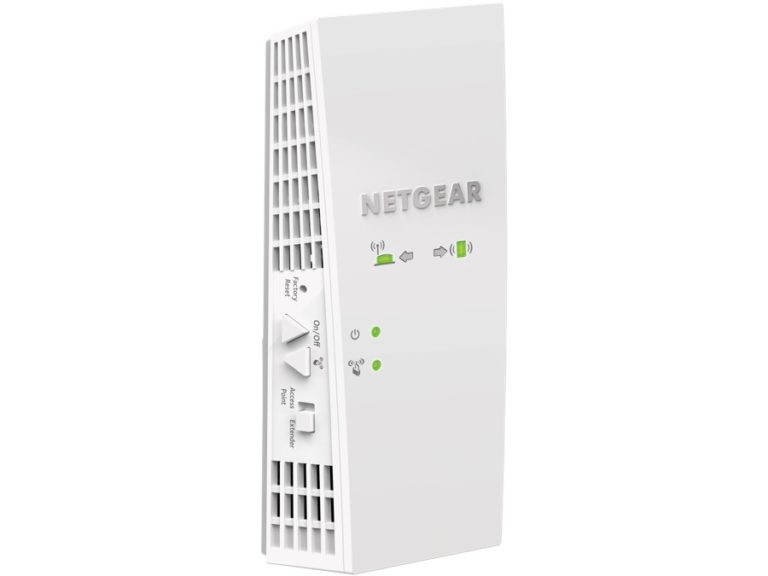
For feature‑rich performance, a tri‑band Wi‑Fi 6E extender like TP‑Link’s RE815XE stands out. It adds the 6 GHz band—cleaner spectrum with up to seven 160 MHz channels—so you can serve compatible devices or dedicate a less congested backhaul when paired with a 6E router (RE815XE; Wi‑Fi 6E). There’s gigabit Ethernet for wired backhaul/AP mode, which preserves full throughput to clients by avoiding same‑band repeating. Reviewers at Wirecutter and PCMag call out 6E models like this as top picks if you already have a 6E router or 6 GHz clients.
MU-MIMO
Modern extenders combine MU‑MIMO and OFDMA to handle many devices at once. If your network is Wi‑Fi 7 end‑to‑end, features like Multi‑Link Operation (MLO) can further reduce contention and latency by using multiple links concurrently, while enhanced EHT sounding improves MU‑MIMO grouping on wide channels (Broadcom).
Simple and self-contained
Setup is app‑guided with signal LEDs for placement. The RE815XE also integrates with TP‑Link OneMesh and can participate in unified SSIDs and coordinated steering when used in a compatible mesh. If your main router supports EasyMesh, look for extenders that can join it to mitigate sticky clients and simplify management.
Points to consider
Price
Premium/tri‑band extenders typically land around $120–$250, overlapping with two‑ or three‑node mesh kits that often run $150–$300. If multiple rooms need help, mesh usually delivers better roaming and backhaul performance per dollar (PCMag; Wirecutter mesh guide).
No adjustable antennas
Compact, internal‑antenna designs are easier to place but limit fine‑tuning. If you want directional placement or more LAN ports for TVs/consoles, consider a desktop‑style extender or wiring an access point in the problem area.

Pros
Affordable
Easy to install
User-friendly
Cons
No MU-MIMO
No beamforming
Why we chose it
Affordable
For most homes on Wi‑Fi 6 routers, an AX3000‑class extender such as TP‑Link’s RE715X offers strong value in the $60–$100 range, with better radios and stability than older AC‑era models. It supports OneMesh and includes gigabit Ethernet for wired backhaul/AP mode—ideal when you can run a cable to eliminate repeater overhead (Wirecutter; PCMag).
Easy to install
App‑based onboarding, signal LEDs, and automatic firmware updates are standard on current models. Prefer app setup over legacy WPS and enable WPA3 where supported for a stronger security posture (WPA3).
User-friendly
Placement aids make it simple to confirm the router’s signal is strong at the extender’s location—critical for a robust backhaul. Unified SSIDs via OneMesh or EasyMesh help reduce sticky‑client issues compared with standalone “_EXT” networks.
Points to consider
No MU-MIMO
Many older budget extenders lacked MU‑MIMO and OFDMA, which is why we favor current Wi‑Fi 6 picks. The RE715X supports these features, but remember: if you repeat on the same band, effective throughput often drops by ~50%—use Ethernet backhaul or a tri‑band extender to mitigate this (NETGEAR).
No beamforming
Modern Wi‑Fi 6/6E/7 extenders implement explicit beamforming; what’s new is that Wi‑Fi 7 expands headroom (up to 16 spatial streams) and improves sounding/scheduling, making beamforming and MU‑MIMO more effective in practice. Multi‑Link Operation (MLO) in Wi‑Fi 7 also reduces latency by selecting or combining links across bands (IEEE 802.11be-2024; Wi‑Fi 7; Broadcom).
How to Find the Right Wi-Fi Extender for You
Evaluate your living situation
Construction and layout matter: brick, concrete, and metal appliances attenuate Wi‑Fi; 5/6 GHz drops off faster through walls than 2.4 GHz. Place the extender where your router’s signal is still strong—roughly halfway to the dead zone—and use the device’s LEDs/app to verify strength (placement guide). Avoid daisy‑chaining extenders; connect each node to the main router (or wire it) for better performance. To reduce sticky‑client issues, prefer unified SSIDs via EasyMesh and enable roaming assists (802.11k/v/r) where available.
Shop by features, not price
Typical 2025 pricing: budget extenders often cost $25–$50, solid Wi‑Fi 6 AX1800–AX3000 units sit around $60–$100, and premium/tri‑band 6E models range $120–$250+ (PCMag). If your needs in the target room are modest (streaming/web under ~200–300 Mbps), a midrange Wi‑Fi 6 extender is usually enough; for 6 GHz clients or a cleaner backhaul, step up to 6E. When multiple rooms or floors need help, a 2–3 node mesh kit at ~$150–$300 is often the better long‑term value (Wirecutter). Always match the extender’s generation to your router and use WPA3; WPA3 is mandatory on 6 GHz (Wi‑Fi 6E).
Scour reviews
Look for measured throughput in the extended area and notes on roaming behavior. Expect lower speeds on same‑band repeaters, and favor models with stable firmware and clear apps. Editorial testing and owner feedback from Wirecutter, PCMag, and RTINGS consistently highlight Wi‑Fi 6/6E extenders as the current sweet spot, while mesh earns higher satisfaction for whole‑home needs.
WiFi Extender FAQ
What is the best Wi-Fi extender for gaming?
Stability and latency matter more than peak link rate. Use Ethernet backhaul (AP mode) when possible, or a tri‑band/6E extender that can dedicate backhaul. Match the extender to your router’s generation (6/6E/7). With Wi‑Fi 7 hardware on both ends, MLO can reduce contention and latency by using multiple links; otherwise, a strong Wi‑Fi 6/6E setup with dedicated or wired backhaul is the safer bet (PCMag).
Is a Wi-Fi extender right for me?
Choose an extender if you have a single weak spot and don’t want to replace your router. For multi‑room problems, a mesh system is usually more reliable and easier to manage (Wirecutter). Many extenders can run in Access Point mode over Ethernet for maximum performance (NETGEAR AP mode). If your router (or ISP gateway) supports EasyMesh, pairing with an EasyMesh‑certified extender gives you one SSID and coordinated steering.
What is the best spot for the Wi-Fi extender?
Place it where your router’s signal is still strong—often midway to the problem area. Don’t put the extender in the dead zone. Use the device’s LEDs/app to verify placement (TP‑Link placement tips). If you must use wireless backhaul, keep the backhaul link on a clean channel and avoid dense obstructions between router and extender.
What is the best Wi-Fi extender for a home business?
Prioritize reliability: a Wi‑Fi 6/6E extender with Ethernet backhaul and WPA3 enabled will usually provide consistent throughput and latency for video calls and large file transfers. If multiple rooms need help, step up to a mesh kit for seamless roaming and simpler management (Wirecutter mesh guide).
Will a Wi-Fi extender increase my internet speed?
No. Extenders expand coverage; they don’t raise your incoming ISP speed. Same‑band repeating typically halves effective throughput due to the extra hop, but Ethernet backhaul or a dedicated 5/6 GHz backhaul can avoid much of this loss (NETGEAR KB). If your internet is feeling sluggish, check out our tips on how to increase your internet speed.
Our Other Internet Reviews
Keep Reading


