


We recommend products and services based on unbiased research from our editorial team. We make money via affiliate links, which means if you click a link on our site, we may earn a commission. Any commissions we receive do not affect our recommendations; if you want to know more about how that works, read more.
Updated for 2025: today’s best streamers emphasize software polish, broad app support, Ethernet options, and smart features like free live channels and ambient modes. Value devices now include premium formats (Dolby Vision/Atmos) and bigger storage, while premium boxes stand out for speed and long-term updates.
The Best TV Streaming Devices
The best streaming devices now deliver consistent 4K HDR, reliable streams, and fast, intuitive interfaces. Since our last update, value hardware caught up on features: Walmart’s Onn 4K Pro and similar boxes add Ethernet, Dolby Vision/Atmos, and larger storage at budget prices, while Apple TV 4K (3rd gen) remains the premium benchmark for speed and polish with tvOS 18 features like InSight (details). We also like Amazon’s Fire TV Stick 4K Max for Alexa households (Wi‑Fi 6E, 16 GB), and Roku Ultra for a simple, app‑first UI (Ethernet, Dolby Vision/Atmos). Google TV now integrates 1,000+ free live channels in its Live tab, boosting no‑cost viewing (source).
How We Chose the Best TV Streaming Devices
Excellent image quality
Picture quality now hinges less on raw resolution and more on accuracy and codecs. We prioritize devices that correctly match frame rate and dynamic range to the source (to avoid judder and tone‑mapping issues), support today’s HDR formats (Dolby Vision/HDR10/HDR10+), and handle modern codecs. Apple TV 4K stands out for near‑flawless frame‑rate/dynamic‑range matching and clean chroma handling (RTINGS review), while Fire TV Stick 4K Max and Roku Ultra add efficient AV1 decoding on services that use it (Fire TV 4K Max) (Roku Ultra). NVIDIA Shield TV remains uniquely strong for AI upscaling of HD to 4K (AI upscaling).
Uninterrupted streaming
Reliable streaming depends on both your network and the device. Most services still recommend roughly 5 Mbps per HD stream and 15–25 Mbps per 4K stream: Netflix (HD 5 Mbps; 4K 15 Mbps) (source), YouTube (~20 Mbps for 4K) (source), Disney+ (4K 25 Mbps) (source), Hulu (HD 3–8 Mbps; 4K 16 Mbps) (source). A stable 70 Mbps Wi‑Fi link can handle several HD or 2–3 4K streams, but for busy homes the FCC’s 100/20 Mbps broadband benchmark is a safer baseline (FCC). Ethernet remains the most consistent option for live sports and multi‑stream households.
Speedy navigation
Fast processors and optimized software make opening apps and jumping between shows feel instant. Apple TV 4K’s A15 chip and tvOS optimizations keep it the responsiveness leader (Apple TV 4K). Amazon’s Fire TV Stick 4K Max improved load times and storage for smoother hopping between apps (source), and Google TV boxes like Onn 4K Pro feel snappy while adding high‑end features on a budget (Ars Technica).
Intuitive interface
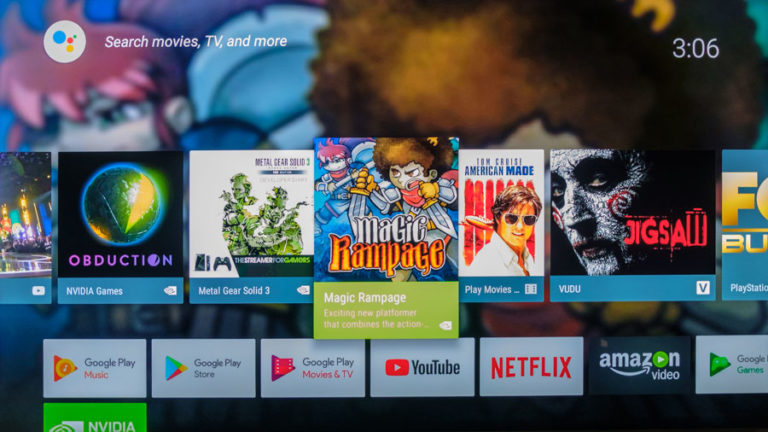
Interfaces differ in philosophy. Roku keeps a clean, app‑first grid with minimal fuss (Roku Ultra). Fire TV emphasizes Alexa integration and content discovery, plus an Ambient Experience for glanceable info and art (source). Google TV surfaces personalized rows and now integrates 1,000+ free live channels directly in the Live tab (source). Enthusiasts still value NVIDIA Shield for its flexibility and unique AI upscaling (Shield).
The 3 Best TV Streaming Devices

Pros
Easy to navigate
HD resolution
Voice search
Ethernet compatible
Cons
Amazon-centric design
No YouTube app

Why we chose it
Easy to navigate
For most households (including 1080p HD sets), the best value is a modern Google TV box like Walmart’s Onn 4K Pro. Its interface surfaces your apps and watch‑next rows clearly and now folds 1,000+ free live channels into the Live tab for instant, no‑download viewing (Google TV). The backlit remote with a finder and far‑field Google Assistant make everyday use simpler than many budget sticks (The Verge) (Ars Technica).
HD resolution
Even on HD TVs, today’s top boxes deliver stable, sharp playback and premium formats so you’re ready for a future 4K upgrade. The Onn 4K Pro supports Dolby Vision and Dolby Atmos at a bargain price and includes ample 32 GB storage for apps (features) (details).
Voice search
With Google Assistant, you can press the mic (or use hands‑free on supported hardware) and say “Play Jaws on Netflix” to jump straight into playback when apps implement deep linking. Google TV/Android TV’s discovery and app‑link frameworks enable direct voice launches across integrated catalogs (Android Developers).
Ethernet compatible
A key advantage at this price: built‑in Ethernet for rock‑solid streaming, especially helpful for live sports and busy homes (source). Prefer Wi‑Fi? Modern Wi‑Fi 6/6E routers can still deliver excellent results, but Ethernet reduces jitter and drops. If you use a Fire TV stick instead, you’ll need an adapter for $15 to go wired.
Points to consider
Software updates and longevity
Walmart’s in‑house Onn brand delivers exceptional value, but its long‑term software update policy is less transparent than Apple’s or Roku’s. If you want the most predictable long‑term support and premium app quality, Apple TV 4K remains the gold standard, and Roku Ultra is a solid simplicity‑first alternative.
App support is broad across platforms
Historic feuds once limited apps — for example, the YouTube/Fire TV standoff (background) — but today YouTube and YouTube TV both have native Fire TV apps (supported devices) (YouTube on Fire TV), and the Apple TV app runs on Fire TV, Roku, and Google TV devices (Apple support).

Pros
4K capability
High quality streaming
Voice search
Ethernet compatible
Cons
Amazon-centric layout
No YouTube app
Why we chose it
4K capability
Apple TV 4K (3rd gen) is our premium 4K pick for its class‑leading performance and format support. The A15 chip, Dolby Vision, and HDR10+ deliver wide TV compatibility and smooth navigation, while tvOS refinements keep the experience cohesive across apps (Apple TV 4K). tvOS 18 adds InSight, smarter subtitles, and better Enhance Dialogue for an even more polished experience (tvOS 18).
High-quality streaming
Apple’s system‑wide Match Frame Rate and Match Dynamic Range settings help ensure movies play in their native cadence and HDR, minimizing judder and tone‑mapping issues for reference‑like output (RTINGS) (Apple support).
Voice search
Siri on Apple TV deep‑links into supported apps via tvOS’s TVServices framework, so commands like “Play [Title] on [App]” open content directly when providers integrate catalogs (Apple Developer) (User Guide).
Ethernet compatible
The 128 GB Apple TV 4K model includes Ethernet and Thread support for smart home hubs (details). If you’re using a Fire TV stick instead, wired networking still requires an adapter.
Points to consider
Higher price than sticks
Apple TV 4K costs more than value sticks and boxes. You’re paying for speed, polish, and long‑term updates; if budget is paramount, consider the Onn 4K Pro or Fire TV Stick 4K Max.
No AV1 codec support
Unlike Roku Ultra and Fire TV Stick 4K Max, Apple TV 4K does not decode AV1; it relies on HEVC/VP9. In bandwidth‑constrained scenarios, AV1‑capable devices may preserve quality more efficiently on services that use AV1 (RTINGS) (Fire TV 4K Max) (Roku Ultra).

Pros
Works with older TVs
Good price
Broad app compatibility
Cons
Slower Wi-Fi
Less intuitive interface
Why we chose it
Works with older TVs
If your TV lacks HDMI, legacy options like Roku Express+ with composite AV once filled the gap, and you can still use HDMI‑to‑AV converters — but results vary and picture quality will be limited (user reports). Where possible, we recommend stepping up to a TV with HDMI or using a streamer on a newer HDMI‑equipped display for the best app support and formats.
Broad app compatibility
App availability is now broad across platforms. YouTube and YouTube TV run on Roku, Fire TV, Apple TV, and Google TV devices (YouTube TV supported devices), and Apple’s TV app is available on Fire TV, Roku, and many Google/Android TV models (Apple support). Disney even merged Hulu content into Disney+ on supported devices in the U.S., simplifying access in one app (Disney), and Max is available via Prime Video Channels for those who prefer aggregation inside Prime Video (Amazon/Max).
Points to consider
Check your Wi‑Fi standard
Older streamers and routers using 802.11 b/g/n can bottleneck performance — 802.11ac (Wi‑Fi 5) is much faster (Intel). Newer Wi‑Fi 6/6E gear and the 6 GHz band improve reliability markedly, and Wi‑Fi 7 adds Multi‑Link Operation for lower latency; for the most consistent results (especially live sports), use Ethernet when available (Wi‑Fi 6E) (Wi‑Fi 7).
Less intuitive interface
Roku’s minimalist grid is easy to learn, but if you prefer a content‑forward home screen with aggregated recommendations and free live channels, Google TV or Fire TV may surface more to watch at a glance (Google TV free channels).
Guide to TV Streaming Devices
How to find the right streaming device for you
Identify your TV’s resolution
The type of TV you have still guides your choice. Standard definition sets are rare; most homes have HD (1080p) or 4K/UHD TVs. 4K models support HDR formats like Dolby Vision/HDR10/HDR10+, which many modern streamers output. If you’re unsure about your TV’s resolution, check the display settings or owner’s manual.
If you don’t know exactly which of these categories your TV falls under, there are a couple ways to check. You can try adjusting your TV’s resolution settings with your remote, and noting what the maximum available setting is — 480p means it’s SD, 1080p is full HD, and 2,160p is considered 4K Ultra HD. If you have the owner’s manual handy, you should also be able to find this information in the manual.
Think about whether you’re planning to purchase a TV soon
With 4K TVs now standard at mainstream prices, it’s worth choosing a 4K‑capable streaming device even if your current TV is 1080p. You’ll get better app support and be ready for HDR formats when you upgrade.
An ethernet connection can improve streaming quality
Wired Ethernet still offers the most consistent experience for live sports and multi‑stream homes, though well‑configured Wi‑Fi 6/6E can be indistinguishable for typical movies/TV. Among popular picks, built‑in Ethernet is available on devices like Roku Ultra and Apple TV 4K (128 GB), and on value boxes like Onn 4K Pro; Fire TV sticks require an adapter for wired networking. Aim for service speeds that match your usage: about 5 Mbps per HD stream and 15–25 Mbps per 4K stream, with headroom; the FCC’s 100/20 Mbps benchmark is a solid household baseline (Netflix) (YouTube) (FCC).
Make sure your streaming services are compatible
Most major services now run on all four big platforms (Roku, Fire TV, Apple TV/tvOS, Google TV/Android TV). YouTube and YouTube TV support all mainstream streamers (supported devices), the Apple TV app extends Apple’s catalog to non‑Apple hardware (supported devices), and some catalogs now aggregate — Hulu content appears within Disney+ for eligible U.S. subscribers (Disney), while Max is available via Prime Video Channels (Amazon/Max). You won’t be able to get YouTube TV on any Amazon device, and Philo is currently available only on Roku devices.
TV Streaming Device FAQ
The Best Streaming Devices: Summed Up
| HDMI cable | |||
| Composite AVI cable | |||
| Ethernet | |||
| 4K Ultra HD |

